Update Unit Price and Tax Percentage

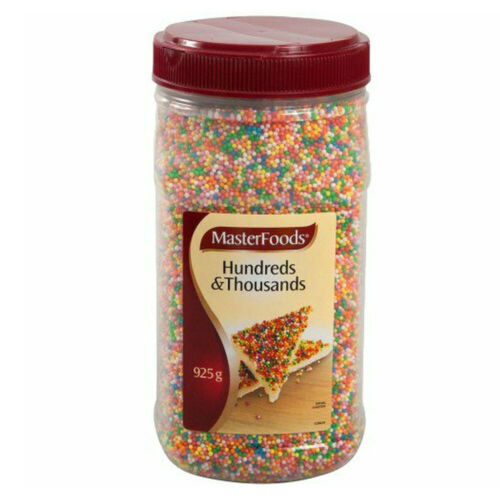
Masterfoods 100s & 1000s
925g Jar | Each of 1
Food Preparation Ingredients > Food Decoration
You have a Pay Before Delivery relationship with this Supplier
Use Default Values
If a default Unit Price and Tax Percentage has been set on this product, you can decide to use the default values here in this catalog as a convenient way to centrally manage pricing for this product. If no default values have been set on the product you won't be able to select this option.
Use Default Values
Unit Price
Set the price for this product in the Catalog. The price is exclusive of tax, and the tax percentage to be added to the price is managed in the field below.
$ AUD
$4.19
Tax Percentage
Set the tax percentage for this product in the Catalog. The tax percentage is the amount that will be added to the tax exclusive unit price above.
Tax %
10

Invoice Line Info
Edit Send Purchase Orders
Decide if you'd like a Purchase Order to be sent to each Supplier once the Requisition has been fully approved, and the Purchase Orders are marked as Sent. If you leave this option un-checked, Purchase Orders will still be generated for each Supplier, but they will not be electronically sent to the Supplier, even when the Purchase Order is marked as Sent. There may be reasons why you don't need the Supplier to receive it, for example you may have phoned ahead and placed your order and you don't wish to send the Supplier a duplicate order.
Thank you! Your submission has been received!
Oops! Something went wrong while submitting the form.
Edit Delivery Details
Select a delivery address from the list below. Additional delivery addresses can be added by an administrator at your organisation. Please speak with your administrator to request additional delivery addresses.
123 Smith St Sydney NSW 2000 Australia
Please select the date you'd like to take delivery of this order. This date will be included on all Purchase Orders that are created when this Requisition is submitted and fully approved. The date will be visible to Suppliers and anyone at your organisation.
12
July
2022
Thank you! Your submission has been received!
Oops! Something went wrong while submitting the form.
PR017254 Settings
A brief description of the Purchase Requisition. This reference will appear on all Purchase Orders that are created when this Requisition is submitted and fully approved. The reference will be visible to Suppliers and anyone at your organisation.
Fruit and Vegetable Order
Decide if you'd like a Purchase Order to be sent to each Supplier once the Requisition has been fully approved, and the Purchase Orders are marked as Sent. If you leave this option un-checked, Purchase Orders will still be generated for each Supplier, but they will not be electronically sent to the Supplier, even when the Purchase Order is marked as Sent.
Select a delivery address from the list below. Additional delivery addresses can be added by an administrator at your organisation. Please speak with your administrator to request additional delivery addresses.
123 Smith St Sydney NSW 2000 Australia
Please select the date you'd like to take delivery of this order. This date will be included on all Purchase Orders that are created when this Requisition is submitted and fully approved. The date will be visible to Suppliers and anyone at your organisation.
12
July
2022
If applicable, select a Department then an Account code to record this Requisition against. Your organisation may use Department and Account Codes for recording Requisition expenses.
Beverage
030150 - Other
Thank you! Your submission has been received!
Oops! Something went wrong while submitting the form.
Journal Entry Out of Balance
The calculated total of all Journal Entry lines including tax, plus the Delivery Fee total including tax, does not match the Invoice Header Total including tax. The variance of $130.00 is outside of the threshold set by your organisation. You will need to review or update each Journal Entry line, each Invoice line, or the Invoice Total (Ex Tax) value, or the Invoice Tax value.
This calculation is used to arrive at the Journal Entry total of $121.00.
Journal Entry Lines Total (Including Tax)
If any Credit Notes have been associated with this Invoice they will appear here.
$130.00
Update
Delivery Fee (Including Tax)
If any Credit Notes have been associated with this Invoice they will appear here.
$21.00
Update
Journal Entry Total (Including Tax)
If any Credit Notes have been associated with this Invoice they will appear here.
$121.00
Update
This calculation isused to arrive at the Invoice Header total of $131.00.
Journal Entry Lines Total (Including Tax)
If any Credit Notes have been associated with this Invoice they will appear here.
$120.00
Update
Delivery Fee (Including Tax)
If any Credit Notes have been associated with this Invoice they will appear here.
$11.00
Update
Journal Entry Total (Including Tax)
If any Credit Notes have been associated with this Invoice they will appear here.
$131.00
Update
The difference between the two values shown above.
Variance
If any Credit Notes have been associated with this Invoice they will appear here.
$30.00
Update
Edit Reference
A brief description of the Purchase Requisition. This reference will appear on all Purchase Orders that are created when this Requisition is submitted and fully approved. The reference will be visible to Suppliers and anyone at your organisation.
Fruit and Vegetable Order
Thank you! Your submission has been received!
Oops! Something went wrong while submitting the form.
PR017254 Settings
A brief description of the Purchase Requisition. This reference will appear on all Purchase Orders that are created when this Requisition is submitted and fully approved. The reference will be visible to Suppliers and anyone at your organisation.
Fruit and Vegetable Order
Decide if you'd like a Purchase Order to be sent to each Supplier once the Requisition has been fully approved, and the Purchase Orders are marked as Sent. If you leave this option un-checked, Purchase Orders will still be generated for each Supplier, but they will not be electronically sent to the Supplier, even when the Purchase Order is marked as Sent.
Select a delivery address from the list below. Additional delivery addresses can be added by an administrator at your organisation. Please speak with your administrator to request additional delivery addresses.
123 Smith St Sydney NSW 2000 Australia
Please select the date you'd like to take delivery of this order. This date will be included on all Purchase Orders that are created when this Requisition is submitted and fully approved. The date will be visible to Suppliers and anyone at your organisation.
12
July
2022
If applicable, select a Department then an Account code to record this Requisition against. Your organisation may use Department and Account Codes for recording Requisition expenses.
Beverage
030150 - Other
Thank you! Your submission has been received!
Oops! Something went wrong while submitting the form.
Filter by Status
Status Filters
Please choose a selection of one or more statuses to include in the filter.
Open
Awaiting Approval
Awaiting Budget Approval
Approved
Declined
Closed
Cancelled
Search
Create
Invoice Number
The number used to identify this Invoice document.
INV000123
Update
Due Date
The payment Due Date recorded on the Invoice.
INV000123
Update
Reference
The reference that appears on the Purchase Order that has been matched to this Invoice.
Fruit and Veg Order
Update
Status
The current status of the Invoice. Click the status to see an explanation of each status type.
Flagged
PDF Copy
If this Invoice was created via Paperless Invoicing, a PDF copy of the Invoice will be available here.
Purchaser
The Purchasing Organisation that this Invoice is made out to.
Example Organisation
Department
The Department that this Invoice expense will be recorded against. Use Journal Entries if you with to record Invoice line expenses to a different Department.
Kitchen
Update
Account Code
The account code that this Invoice expense will be recorded against. Use Journal Entries if you with to record Invoice line expenses to a different Account Code.
00001111
Update
Tax Code
The Total value of the Invoice, including tax. This value is calculated from the two values above.
--
Supplier
The Supplier that sent the Invoice.
Purchase Order
The Purchase Order that has been matched to this Invoice, if any. An Invoice must have a Purchase Order matched to it before it can be reconciled.
Update
Receiving Notes
The Goods Receiving Notes that are associated to this Invoice via the matched Purchase Order.
Update
Credit Notes
If any Credit Notes have been associated with this Invoice they will appear here.
Not Balancing
Invoice is Out of Balance
Invoice Lines
These values show the calculated total of all of the Invoice Lines. These values are updated automatically if a change is made to any of the Invoice Lines.
Excluding Tax
$100.00
Tax
$10.00
Delivery Fees
These values are use to show the Delivery Fees applicable on the Invoice, if any. These values are set when the Invoice is created and you can make changes to these values by clicking the Update Totals button above.
Excluding Tax
$10.00
Tax
$1.00
Adjustments
These values can be used to make fine adjustments to the Invoice value if necessary, for example to resolve a rounding error. You can make changes to these values by clicking the Update Totals button above.
Excluding Tax
$0.00
Tax
$0.00
Totals
These values should be equal to the sum of all of the Invoice parts above. These values are set when the Invoice is created, and they do not recalculate automatically. You can make changes to these values by clicking the Update Totals button above.
Total Excluding Tax
$110.00
Total Tax
$3.00
Invoice Total
$113.00
Invoice Total Out of Balance
The sum of the Invoice parts does not balance with the Invoice Total
You can Operationally Approve this Invoice
You can Financially Approve this Invoice
This Invoice is Flagged
Flagged
General
Invoice Number
The document number used to identify this Invoice. The Invoice number does not need to be unique, but we recommend that it is kept unique. If the Invoice was created by PurchasePlus Paperless Invoicing, the Invoice Number will be found when the original PDF was scanned. You can make changes to the Invoice Number here if needed.
INV000123
Reference
A brief description of the Invoice. If this Invoice is already matched to a Purchase Order, the Reference showing on the matched Purchase Order will be copied to here. You can make changes to the Reference here if needed.
Fruit and Vegetable Order
Invoice Date
This is the Date of the Invoice. If the Invoice was created by PurchasePlus Paperless Invoicing, the Invoice Date will have been found when the original PDF was scanned. You can make changes to the Invoice Date here if needed.
12 July 2023
Tax Code
Your Organisation may use Tax Codes for recording Invoices expenses.
Select
Department and Account Code
If applicable, select a Department then an Account Code to record this Invoice against. Your organisation may use Department and Account Codes for recording expenses. If the Invoice is matched to a Purchase Order, the Department and Account Code on the Purchase Order will be set here. You can make changes to these fields here if needed.
Beverage
030150 - Other
Advanced
Auto-Balance Invoice
If applicable, you can set the Invoice to Auto-Balance. If this option is selected, the Invoice will automatically calculate and update the Tax and Ex-Tax totals of the Invoice if there are any changes made to the Invoice. This can be useful to avoid needing to manually adjust the Invoice Totals when you make changes to the Invoice lines.
Auto-Balance Invoice
Invoice Details
Invoice Number
INV000123
Matched Purchase Order
The Purchase Order that has been matched to this Invoice, if any. An Invoice must have a Purchase Order matched to it before it can be reconciled.
Invoice Type
If the Invoice was manually created the Invoice type will be "Manual". If the Invoice was created via Paperless Invoicing, the Invoice type will be "PDF".
PDF
Created On
The time and date the Invoice was created in PurchasePlus.
9:34am September 12th, 2023
Supplier
Total Excluding Tax
$104.89
Tax
$11.68
Total Including Tax
$116.89