Zeus Wholesale is Enabled
Zeus Wholesale
Supplier Details
You can contact the supplier using the details below.
Delivery Fees
The table below shows delivery fees for this supplier by total order value, excluding tax. The delivery fees are based on your trading agreement with this Supplier. Delivery fees will only appear on the Purchase Order once the Requisition has been submitted and approved. Delivery fees shown here are a general guide and the supplier reserves the right to charge additional delivery fees based on weight or volume or certain products.
Match to Master List
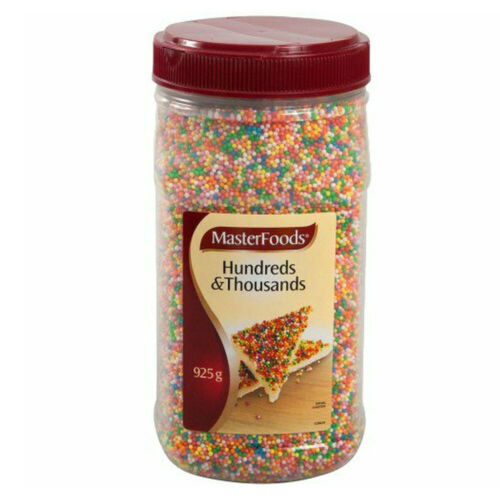
Masterfoods 100s & 1000s
925g Jar | Each of 1
Food Preparation Ingredients > Food Decoration
You have a Pay Before Delivery relationship with this Supplier
Master Product List
Here you can search the PurchasePlus master product list and find a master product to match your product to. This is optional, but provides great benefits when your buyers are comparing your products with the same products from other suppliers. Your buyers may request that you match some or all of your products. Matching your product here to a master product will not change anything about your product, but if a master image is available it will be used on your product unless you upload your own product image. Note that once you do apply a match, if you wish to change some of the fields on your own product, it may mean that the match will no longer be applied. If you cannot find a matching product, you can request that it be added to the master product list.
Note that the results below are already filtered by category and other product fields from your product.
Manage Product Image
Masterfoods 100s & 1000s
925g Jar | Each of 1
Food Preparation Ingredients > Food Decoration
You have a Pay Before Delivery relationship with this Supplier
Upload a Product Image
Click the field below to browse your device or drag and drop a product image here. The image must be a PNG, JPG or GIF and must be exactly 500px wide and 500px high. We suggest using product images on a white background.
Drop Image Here
Upload a PNG, JPG or GIF exactly 500px x 500px
Match to Master List
Masterfoods 100s & 1000s
925g Jar | Each of 1
Food Preparation Ingredients > Food Decoration
You have a Pay Before Delivery relationship with this Supplier
Master Product List
Here you can search the PurchasePlus master product list and find a master product to match your product to. This is optional, but provides great benefits when your buyers are comparing your products with the same products from other suppliers. Your buyers may request that you match some or all of your products. Matching your product here to a master product will not change anything about your product, but if a master image is available it will be used on your product unless you upload your own product image. Note that once you do apply a match, if you wish to change some of the fields on your own product, it may mean that the match will no longer be applied. If you cannot find a matching product, you can request that it be added to the master product list.
Note that the results below are already filtered by category and other product fields from your product.
Update Catalogues
Masterfoods 100s & 1000s
925g Jar | Each of 1
$4.19
Plus 10% Tax
You have a Pay Before Delivery relationship with this Supplier
Catalogue List
Decide which catalogue you wish this product to appear in and a specific price and tax percentage for each catalogue. You can choose the use default price and tax percentage if you wish to ensure the product will always match your default price.
Test Catalogue
General Buyers Catalogue
This catalogue is currently assigned to the following purchasers. Visit your catalogues area to manage the assigment of catalogues. Learn more.
The Sofitel Brisbane
The Landmark Hotel
The Mornington Peninsula Tourist Center
Decide on the tax exclusive price and tax percentage for this product in this catalogue. You can add specific values or choose to use the defaults to ensure the product will always match the default values in this catalogue.
Use Default Values
Another Catalogue
Another Catalogue
Another Catalogue
Another Catalogue
Another Catalogue
Another Catalogue
Another Catalogue
Update Category
Category List
Find a category and sub-category to apply to your product.
Anaesthesia Respiratory and Resuscitation
Automotive
Automotive Filters
Automotive Fluids
Automotive Pumps
Automotive Tools
Bakery
Beer
Building and Construction
Chemicals and Gasses
Cleaning and Janitorial
Clothing and Footwear
Computers and Communication Equipment
Electrical Systems and Lighting
Food Service Equipment
PR017235 Approvers
Approval Workflow
The following approval workflow applies to this requisition.
Beverage Policy Approval Workflow
Already Approved By
The following users have already approved this requisition.
Daniel Richards
Next Approvers
Any of the following users can approve this requisition next.

John Sorenson
Sharon Donalds
Sandra Gurney
Filter by Status
Status Filters
Please choose a selection of one or more statuses to include in the filter.
Open
Awaiting Approval
Awaiting Budget Approval
Approved
Declined
Closed
Cancelled
Search
Create
Zeus Wholesale
CAC0001
Supplier Name
The name of the Supplier.
Zeus Wholesale
Supplier Number
The Number that your Organisation has assigned to the Supplier.
1639916
Business Number
The legal Business Number of the Supplier.
17356999163
Relationship Status
Indicates if both your Organisation and the Supplier have enabled trading with each other.
Enabled by Purchaser
Indicates if your Organisation has enabled trading with the Supplier.
Enabled by Supplier
Indicates if the Supplier has enabled trading with your Organisation.
Self Managed
Indicates if the Supplier manages their own profile on PurchasePlus, or if the Supplier is managed by your Organisation.
No
Preferred Supplier
As one or more Invoices are matched to the Purchase Order, the Invoices are listed here.
Default Department
The Department that this Purchase Order expense will be recorded The default Department that is assigned to this Supplier by your Organisation, if any. When a Single Supplier Requisition is created for this Supplier, the Requisition will be set to this Department.
Kitchen
Default Account Code
The default Account Code that is assigned to this Supplier by your Organisation, if any. When a Single Supplier Requisition is created for this Supplier, the Requisition will be set to this Account Code.
00001111
Update
Default Category
The default Category and Sub-Category that is assigned to this Supplier by your Organisation, if any. Products created on behalf of this Supplier will be assigned this Category.
Automotive > Bearings
Update
Supplier Phone
The contact phone number of the Supplier.
+61 8234 5678
Supplier Email
The contact email address of the Supplier.
orders@zeuswholesale.com.au
Location Code
The location code of the Supplier.
124124
Update
Billing Address
The Billing Address of the Supplier.
123 Smith St Sydney NSW 2000 Australia
Update
Postal Address
The Postal Address of the Supplier.
123 Smith St Sydney NSW 2000 Australia
Update
Invoicing Email
The Paperless Invoicing Email Address assigned to this Supplier. If the Supplier sends you an Invoice to this Email Address the, Invoice will be automatically added to your Invoices.
email@invoicing.purchaseplus.com
Update
Supplier Details
Trading Enabled
Your trading relationship with Zeus Wholesale is currently Enabled, meaning that you can place orders with this Supplier. The Supplier can assign catalogues, products and prices to your organisation, and you can add these to your Cart when creating a Requisition. Speak with an administrator at your organisation if you wish to disable this Supplier.
Enabled
Trading Disabled
Your trading relationship with Zeus Wholesale is currently Disabled. This means that you can't place orders with this Supplier at the moment. Speak with an administrator at your organisation or contact our friendly customer success team if you wish to have your trading relationship with this Supplier re-enabled.
Disabled
Supplier Details
Self-Managed
The workflow of individual users who will be required to approve this Purchase Requisition. The workflow is determined by the Department and Account Code set on the Requisition.
No
Supplier Number
CAC0001
Billing Address
34 Smith St Sydney NSW 2000
Postal Address
34 Smith St Sydney NSW 2000
Supplier Phone
+61432897654
Supplier Email
orders@zeuswholesale.com.au
Key Contact Details
Key Contact Person
The workflow of individual users who will be required to approve this Purchase Requisition. The workflow is determined by the Department and Account Code set on the Requisition.
Shelly Smith Accounts
Key Contact Email
accounts@zeuswholesale.com.au
Delivery Fees
$0 - 150
The size of 1 unit of this item. E.g. "375" for a 375ml Can.
Receive Goods
$40 Plus 10% Tax
Above $150
The size of 1 unit of this item. E.g. "375" for a 375ml Can.
Receive Goods
Free Delivery
Delivery fees are set by the Supplier based on your trading agreement. Delivery fees will be automatically applied to a Purchase Order. Delivery fees shown here are a general guide and the Supplier reserves the right to charge additional delivery fees based on other location or product criteria such as weight or volume of certain products.
Service Regions
Receive Goods
Australia (NSW Metro)
Receive Goods
Australia (NSW Regional)
Receive Goods
Australia (VIC Metro)
Show 19 More
Service Regions are a general guide only. The Supplier may have additional specific service region conditions that are not shown here. Please contact the Supplier to discuss specific service region information if needed.
Settings
Supplier Number
The Supplier Number here is optional but can help people at your organisation identify this Supplier.
CAC0001
Supplier Location Code
If your Invoice Export format uses the Supplier Location Code, you can enter this here.
Enter Location Code
Key Contact Person
Add the name and contact email address of your Key Contact Person at 01 Computer System Pte Ltd.
Name
Shelly Smith (Accounts)
Email Address
accounts@zeuswholesale.com
Default Department and Account Code
The default Department and Account Code is optional but can be used to pre-fill the Department and Account Code fields when a Purchase Requisition is created for this Supplier by users at your organisation.
Select a Department
Default Category and Sub-Category
The default Category is optional but is used as a quick way to assign a category and sub-category to any self-managed product that is created for this Supplier. This field is also used in some reports.
Select a Category
Payment Terms
If you have specific Payment Terms that you have agreed to with this Supplier, you can add them here so that users at your Organisation can refer to these when needed.
Enter Payment Terms
External Shopping
If the Supplier offers shopping via their external website, then this can be configured here. You will need to obtain a URL, Username and Password from the Supplier, and enter these details below. Speak with our friendly customer success team if you need assistance configuring External Shopping.
Enable External Shopping
External Shopping URL
Enter URL
Username
Username
Username
Password
Supplier Details
Self-Managed
The workflow of individual users who will be required to approve this Purchase Requisition. The workflow is determined by the Department and Account Code set on the Requisition.
No
Supplier Number
CAC0001
Billing Address
34 Smith St Sydney NSW 2000
Postal Address
34 Smith St Sydney NSW 2000
Supplier Phone
+61432897654
Supplier Email
orders@zeuswholesale.com.au
Key Contact Details
Key Contact Person
The workflow of individual users who will be required to approve this Purchase Requisition. The workflow is determined by the Department and Account Code set on the Requisition.
Shelly Smith Accounts
Key Contact Email
accounts@zeuswholesale.com.au
Delivery Fees
$0 - 150
The size of 1 unit of this item. E.g. "375" for a 375ml Can.
Receive Goods
$40 Plus 10% Tax
Above $150
The size of 1 unit of this item. E.g. "375" for a 375ml Can.
Receive Goods
Free Delivery
Delivery fees are set by the Supplier based on your trading agreement. Delivery fees will be automatically applied to a Purchase Order. Delivery fees shown here are a general guide and the Supplier reserves the right to charge additional delivery fees based on other location or product criteria such as weight or volume of certain products.
Service Regions
Receive Goods
Australia (NSW Metro)
Receive Goods
Australia (NSW Regional)
Receive Goods
Australia (VIC Metro)
Show 19 More
Service Regions are a general guide only. The Supplier may have additional specific service region conditions that are not shown here. Please contact the Supplier to discuss specific service region information if needed.